
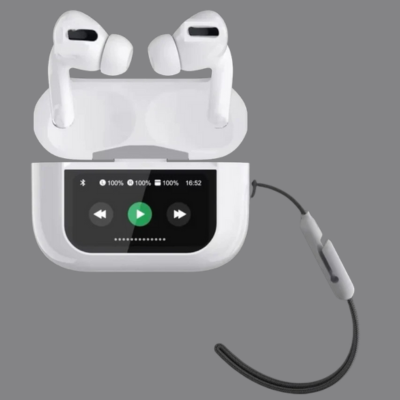
DISPLAY GPODS PRO 2 WITH ANC
Engineered for the real world—not just silent test rooms—GPods Pro 2 blends balanced audio, dependable ANC, and a snug, pocket-ready case.
Price
Rs. 1,499.00
Color: Classic Black • In-Ear • Bluetooth 5.x
Get in Touch
Questions about products, combos, bulk orders, or support? Send us a note.
Why You’ll Love GPods Pro 2
Tuned, All-Day Sound
Balanced drivers deliver rich lows, clear mids for vocals, and crisp highs without harshness. Whether you’re streaming podcasts or playlists, the tuning keeps details intact with fatigue-free listening.
- Crisp calls & vocals; no muddy midrange.
- Refined bass—present yet controlled.
- Volume curve optimized for noisy environments.
Real-World ANC
Active Noise Cancellation is tuned for the hums you actually face—traffic, fans, office chatter—so music stays present without the “ear pressure” effect. Transparency mode lets in ambient sound when needed.
- Balanced ANC for comfort over long stretches.
- Quick ambient passthrough for conversations.
- Stable performance in busy areas.
Battery That Keeps Up
Enjoy long playtime on a single charge, with quick top-ups from the compact case. Short on time? A fast charge delivers hours of listening in just minutes.
- Case + buds designed for efficient top-ups.
- Battery estimates vary by volume/ANC usage.
- USB-C charging—modern, reversible, reliable.
Seamless Pairing & Calls
Open the case, pair, and you’re in. The mics cut background buzz for the person on the other end, while Bluetooth 5.x keeps the link steady.
- Quick connect with most Android & iOS devices.
- ENC mic cleanup for clearer speech.
- Low-latency optimization for videos and casual gaming.
Specifications (Key Facts)
Fit, Care & Safety
Perfect the Seal
Try all ear tip sizes to get a snug seal; that’s where bass and ANC come alive. Insert, then gently twist forward to lock. For workouts, choose the firmer tips for extra grip.
- Use the size that feels secure without pressure.
- Reseat if you sense channel imbalance or thin bass.
- Keep tips clean to maintain hygiene and sound quality.
Care Basics
Wipe the earbuds and case with a dry microfiber cloth. If moisture gets in, let them air-dry before charging. Avoid solvents or sprays. Keep charging contacts lint-free for reliable top-ups.
Listening Safety
Keep volumes moderate to protect your hearing. Use Transparency mode when crossing roads or speaking with others. For long sessions, take short breaks to avoid fatigue.
Compatibility & Quick Fixes
First-Time Pairing
- Open the case and hold the pairing button until LEDs blink.
- On your phone/laptop, enable Bluetooth and select “GPods Pro 2”.
- Allow call/media permissions if prompted.
Switching Devices
Disconnect from the first device or select the earbuds from the new device’s Bluetooth list. If stuck, reset pairing from the case and connect fresh.
Quick Fixes
- No sound? Toggle Bluetooth off/on and reselect output.
- Uneven audio? Clean tips, reseat, and check phone balance.
- Mic low? Ensure “Headset/Hands-Free” is selected during calls.
Frequently Asked Questions
Does GPods Pro 2 support Active Noise Cancellation?
Yes. It features balanced ANC designed for daily environments like traffic or office hum. You can also switch to Transparency/Ambient mode when you need awareness.
How long does the battery last with ANC on?
Battery life depends on volume and your surroundings. With ANC on, expect a modest reduction compared to standard mode. Quick top-ups via USB-C help you stay powered through the day.
Are these compatible with my iPhone or Android phone?
Yes. They pair seamlessly with most iOS and Android devices via Bluetooth 5.x. For calls, ensure permissions are granted and the earbuds are selected as the active audio device.
Can I use them for workouts?
Absolutely. The earbuds are sweat-resistant and designed to stay secure. Try different tip sizes to optimize grip during movement.
What if I face pairing or audio imbalance issues?
Reset pairing from the case and reconnect, clean the tips/drivers gently, and check your phone’s audio balance in accessibility settings. Our support can guide you through additional steps if needed.